A voice-driven daily document

Subtitles for your thoughts.

Speak your day into a clean markdown file on your Mac. Read it, edit it, share it. It works on its own, and it opens in VS Code, Obsidian, or any tool you point at it.

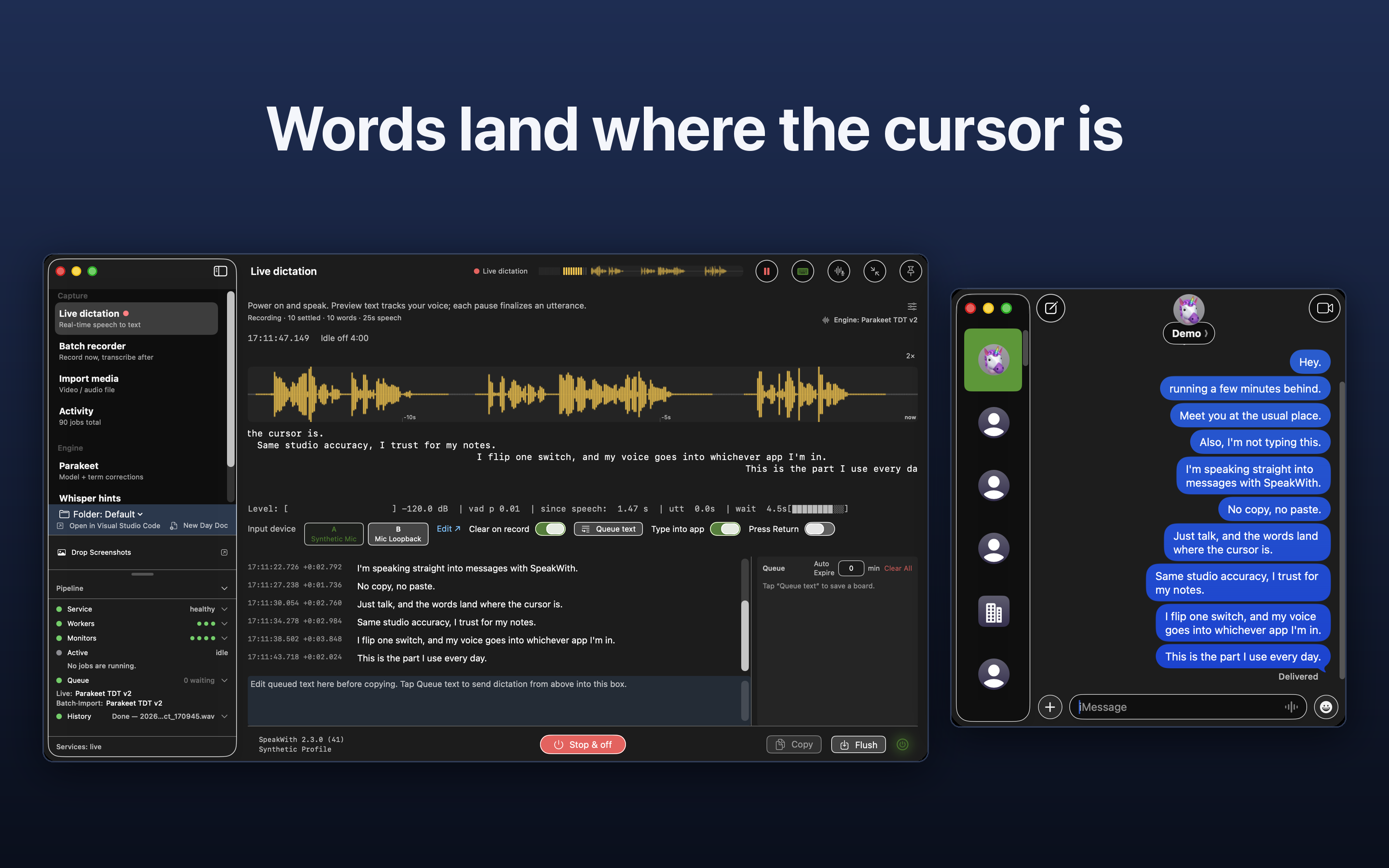
Use the recorder switch or a hotkey. Talk, and the words land where the cursor is.

Available on Mac today. An iOS companion is on the way. Recording and transcription happen on your device. No account required.

Words land as you speak, and you can edit them live.

SpeakWith for Mac in live dictation: spoken words landing as transcribed lines under a live waveform, with misheard names corrected in place and a session title suggested alongside.
Speak, and watch the subtitles for your thoughts take shape before the idea slips away. Optional session titles can use your OpenAI key or a local Ollama model on your Mac. Press Generate new title when you want a heading.

A mobile version is in the works

A recorder for the desk, a companion for everywhere else

SpeakWith is a voice recorder. It is tuned for speech and dictation, the way a person actually talks, not for capturing music or ambient sound.

The studio

SpeakWith for Mac

Live and batch recorders, audio and video import, and a choice of transcription engines: Apple on-device, Whisper, or Parakeet. Every recording lands in your daily document, with playback you can click straight into. The direct build can also type finished phrases into the app you are already using.

  • Live and batch recording
  • Hands-free standby when you want it
  • Type into app (direct build)
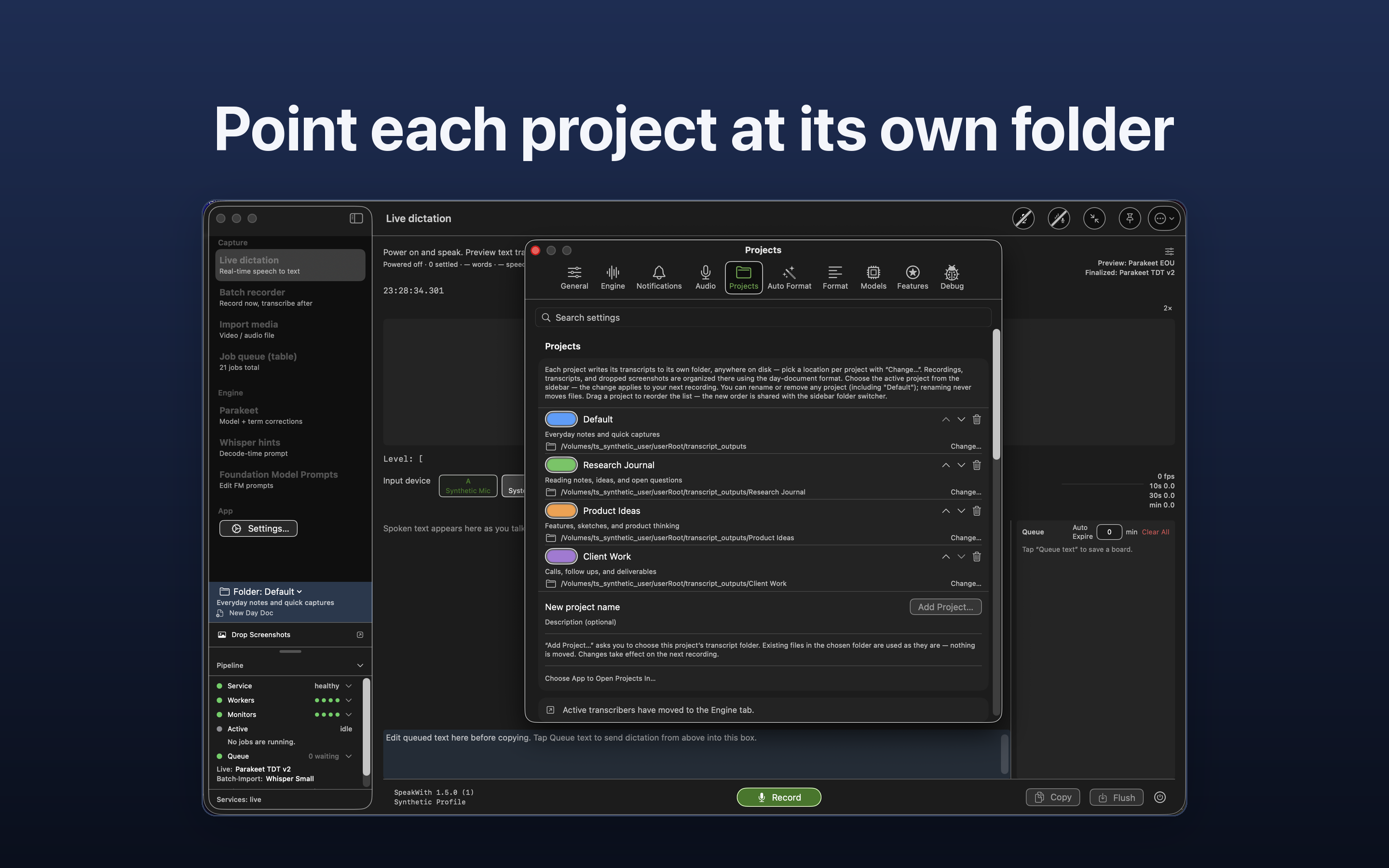
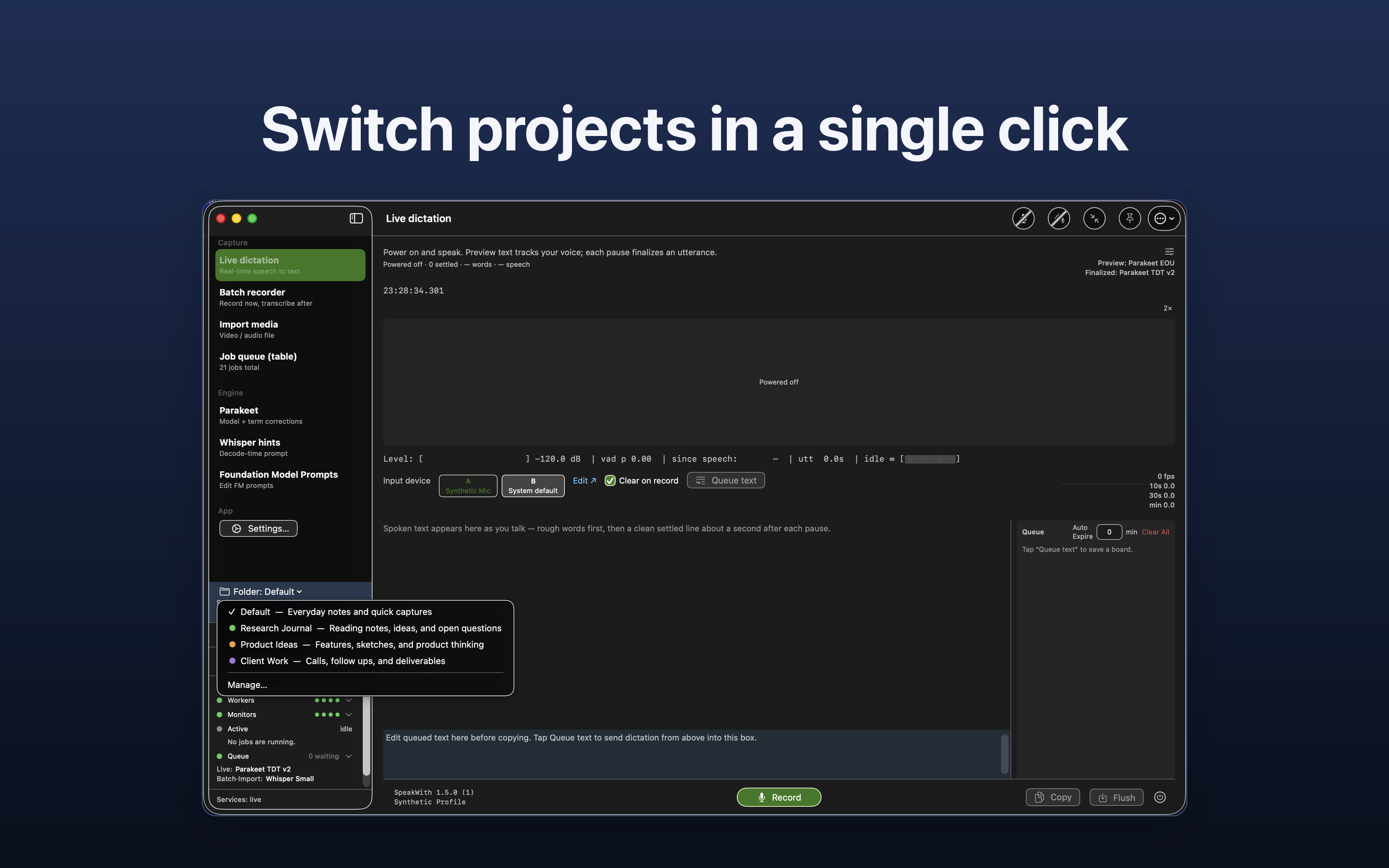
  • Projects with separate folders
  • Import audio and video
  • Apple, Whisper, and Parakeet engines

The companion

SpeakWith for iOS

A voice recorder for when you are away from the desk. Live dictation, a dictation board that collects what you capture, and your transcripts and audio files kept close. Transcription runs on-device with Apple Speech.

  • Live dictation
  • Dictation board
  • Transcripts and audio files
  • On-device Apple Speech
  • English today, more languages in development

Type into app

Dictate into Messages, Mail, or any app with a cursor

On the direct Mac build, turn on the recorder switch or a hotkey. SpeakWith types finished phrases into whichever app has focus.

A real take: SpeakWith typing into Messages as each utterance settles.

Live dictation

Fix lines as they land

Wrong word? Wrong line? Edit or remove it while you are still recording. No need to wait for a finished take.

SpeakWith live dictation showing a line marked for removal: This line does not belong here, with the minus control highlighted beside the timestamp.
Drop a line that does not belong with the minus tool, still mid-session.
SpeakWith live dictation with one line open for inline editing: the text The metering is at tree o'clock is in an edit field with Save and Cancel, while recording continues.
Tap a line, fix the wording, save. The take keeps going.

Corrections

Additional layers of control over what gets written

Recognition is never perfect, so SpeakWith adds a few of its own on top of the engine. Each one decides a little more of what actually reaches the page.

Teach tricky terms by voice.

Some terms come back wrong every time you say them, usually names and jargon. Record a few readings of one and SpeakWith keeps them as reference sound. Each example shows what the engine actually heard. That gives SpeakWith more ways to spot the word, and shows you whether one it keeps missing can be corrected at all.

The SpeakWith Voice Examples pane: a list of special terms on the left, the term Nguyen selected on the right, each recorded example showing a Heard as line beneath it, and a Record Example button.
Add the term, record a few readings, and see what each one was heard as.

Special terms

Some words are not spelled the way they sound. Worcestershire is one. List the names and jargon you rely on and live dictation watches for them, widening how each one can be matched so it survives more than one pronunciation. Others are harder still: Siobhan is spelled by Irish rules rather than English ones, so its letters do not map onto English sounds at all. For those you can point a spoken cue at the word instead and say Sierra Bravo to write it. Every substitution that fired is listed in a report.

Hallucination gate

Voice detection on its own cannot always tell a breath from a word, and a recognizer handed one can return a word you never said, sometimes a Yeah or an Okay. The gate waits for the written text, then blocks activations that were never meant as speech. New filler goes on the block list as you meet it, so it stops reaching the page.

See what each correction looks like on the line.

More of the Mac app

Recordings, daily document, playback, and projects

SpeakWith live dictation beside macOS Messages: the typing switch is on, and the same spoken lines appear as delivered iMessage bubbles.
Use the recorder switch or a hotkey. Words appear in whichever app you are using.
The day's dictation as a markdown file open in VS Code: a dated daily document of transcribed notes.
Everything lands in a plain .md file, ready to open in any editor.
A finished recording open in SpeakWith: the Activity list on the left grouped by day with a summary under each recording, timestamped transcript sentences on the right with the current line highlighted, and a waveform with playback controls underneath.
Every recording in one place, grouped by day and summarized. Click any line to jump to that moment in the original recording.
SpeakWith Settings showing several named projects, each with its own transcript folder and color.
Set up separate projects and point each one at its own folder.
The project switcher menu open, listing projects with the active one checked and color tinted.
Switch between projects in a click to send new work to the right folder.

Your recordings stay on your Mac. Plain files, no account.

Local

Your recordings never leave your Mac. Optional session titles can run on a local Ollama model or your own OpenAI key, and only when you switch them on. A separate optional correction check can ask OpenAI to vet flagged lines.

Markdown

A plain .md file on disk. Open it in VS Code, Obsidian, or any editor. Feed it to any tool.

No account

No login. No subscription cloud. No data trade.

On your computer

Transcription and summarization run on your Mac. Nothing is uploaded. Ever.

For the AI-skeptical, too

You don't have to talk to AI to use this.

SpeakWith works on its own. Speak, get a clean markdown file, then edit it, search its text, and share it. Keep it that way for as long as you like.

The file is also something you can hand to an AI when you decide that's useful. AI is a thing the file can do, not a thing you have to do.

What SpeakWith does

A document for every day

Everything you record or type on a given day flows into a single organised document, in the order it happened. Tomorrow, a fresh one begins.

Type into app

Turn on the switch in the live recorder, or set a hotkey in Settings. SpeakWith types each finished phrase into the app with focus. Available in the direct (Gumroad) Mac build.

Bring in audio & video

Drop in a voice memo, a recorded call, or a screen recording. SpeakWith writes it up and folds it into your daily document like anything else.

Session titles, local or cloud

Name each dictation session from its transcript. Pick OpenAI or a local Ollama model under Settings, Session AI. Generate stays in the AI sidebar when you want a heading.

Speak and keep working

Speaking and working no longer take turns. Your dictation flows into the document on its own, so you can organise sections, paste in snippets, or type something completely different at the same time, without interrupting the words you're capturing.

Speaking rhythm, on screen

A live meter shows the pauses inside what you are saying. Over time, that quiet feedback shapes how you speak: you hold a topic together longer, and the text on the other end gets easier to work with.

Work at twice the pace

Like having an extra pair of hands

Most tools force you to shift your focus from thinking to operating an application. SpeakWith removes that friction. Every recorder lives in the same application, and what you capture writes out to the project you have selected.

You can control SpeakWith with a remote microphone, so you never need to touch the keyboard, and there is no key to remember before you start recording. On the direct build, turn on the recorder switch or a hotkey and speak into the app you are already in.

Practice, every time you speak

The longer you use it, the better you speak.

While you record, a small meter shows the pauses inside what you are saying. Over weeks, the effect adds up. You notice when a thought starts to fragment, you stay on a topic a beat longer, and the next time you do it a little more cleanly.

The text on the other end changes too. Single topics arrive in coherent pieces, and paragraphs hold together, so your daily document is something you can hand to a person or a tool without reshaping it first.

Built for how real work happens

The home base your thinking returns to

Real work runs in parallel. You start something that takes time to come back: a long process, a tool working away, a task you've handed off. Instead of waiting, you begin the next thing, then another. Before long, several are in flight at once.

Tools come and go; your daily document stays. It is the one place that holds every thread in a single file that is yours: what each one is for, where you left it, what to check when it lands. You can keep many things moving at once because you are not holding them all in your head.

Frequently asked questions

Does SpeakWith need an internet connection?

No. Recording, transcription, organising your daily document, and searching its text all happen on your Mac. SpeakWith does its core work offline.

Can the optional AI features run locally?

Session titles can. Choose Ollama under Settings, Session AI, and titles stay on your Mac. Correction checks, if you enable them, use your OpenAI key. Core recording and transcription never need the network.

Where are my recordings and documents stored?

As ordinary files on your Mac. You can open, copy, back up, and delete them with any tool you like. They are not locked inside the app or held in an account.

How accurate is the transcription?

Automatic transcription is very good but never perfect. Names and specialist terms are the usual places small errors appear. Your daily document is fully editable, so treat the transcript as an excellent first draft you can correct.

See how the recorder reports your correction rate.

Does using SpeakWith change how I speak?

It can, through quiet feedback. While you record, a small meter shows the pauses inside what you are saying, something you can glance at without breaking your train of thought. Over weeks, you may hold a topic together longer and let it land in a single, coherent piece. Your daily document gets easier to work with, and so can the way you speak to people away from the screen.

Can I import audio and video I already have?

Yes. Import a voice memo, a recorded meeting, or a screen recording, and SpeakWith writes it up the same way it writes up a live recording.

Can I keep working while a recording is written up?

Yes. That is one of SpeakWith's best features. Type and paste into the day's document while dictation is still processing; everything ends up in the correct chronological order.

Can I dictate into other apps?

Yes, on the direct (Gumroad) Mac build. Turn on the recorder switch, or set a hotkey in Settings. SpeakWith types each finished phrase into whichever app currently has keyboard focus. Your daily document still receives everything as usual. The sandboxed App Store build cannot do this; macOS does not allow cross-app typing from sandboxed apps.

Is there an iOS app?

It's on the way, and it will be free. SpeakWith for iOS is a companion voice recorder: live dictation, a dictation board that collects what you capture, and your transcripts and audio files on hand. It transcribes on-device with Apple Speech, and it works alongside the Mac app rather than replacing it.

On iOS, the permission prompt says speech is "sent to Apple". Is my voice uploaded?

No. That line is Apple's standard wording for the speech-recognition permission, shown to every app that asks for it. SpeakWith transcribes on-device using Apple's built-in dictation: your audio is turned into text on your iPhone or iPad. The only thing that downloads is the speech model itself, once. After that, transcription runs on your device.

What languages does SpeakWith support?

English today. Support for more languages is in development, and they will arrive in updates as they are ready.

Is this an audio recorder?

It is a voice recorder. SpeakWith is tuned for speech and dictation, the way a person actually talks, so it does its best work on the human voice. It is not built for capturing music or ambient sound.

Is the Mac download signed and checked by Apple?

Yes. The direct Mac download is signed with our Apple Developer ID, so the apps you install match the build we shipped. Before upload, Apple's notary service scans that submission for known malicious software and for code-signing problems, and we staple the ticket so Gatekeeper can check it. That scan is not an App Store review, and it is not a promise that the software is free of malware.

Get SpeakWith

SpeakWith runs on a Mac with Apple Silicon (M1 or later) and macOS 26 (Tahoe) or later. Download it, grant microphone access, and your first recording is a click away. An iOS companion for iPhone on iOS 26 or later is on the way.